EPP, EDR, XDR, MDR... WTF?!
Demystifying Security Services
Setting the Stage: Your Digital Office
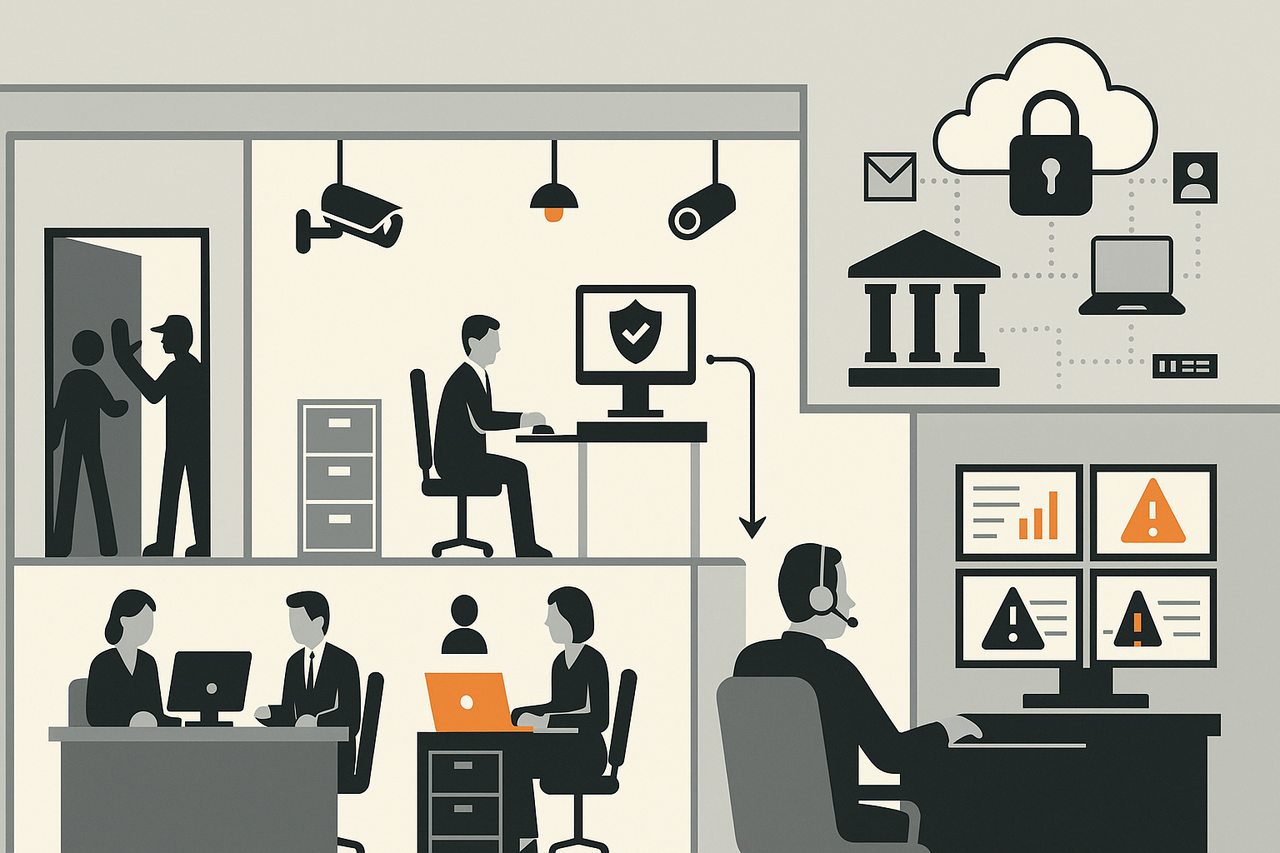
Think of your computer system as an office inside a larger office building.
- The office walls, wiring, and shared spaces = your operating system.
- The office workers = your applications.
- The IT support staff = the tools and services that secure, monitor, and repair.
Security acronyms (EPP, EDR, XDR, MDR) are just different ways to guard that office. Vendors throw them around, but each one adds value in a specific way—and each has its own business model.
The critical point for Canadian institutions: you must hold the keys. If the vendor controls the locks, updates, or remote access, then under U.S. law they can be compelled to hand over your data.
What They Actually Do
Let’s go step by step, using the office example.
EPP (Endpoint Protection Platform)
What it does:
- The front-door security guard.
- Checks every visitor against a list of known troublemakers.
- Stops them at the door if they match.
Why it matters:
- Prevents obvious threats like viruses and common malware.
- Reduces daily disruptions so your IT team isn’t constantly firefighting.
- Establishes a baseline of security every organization needs by whitelisting who should be there.
How vendors make money:
- Annual per-computer subscription.
- Commodity product: cheap, widely bundled into consumer antivirus.
EDR (Endpoint Detection and Response)
What it does:
- The security cameras with a guard looking for known suspicious patterns and an incident log inside your office.
- Doesn’t just stop people at the door—it records what happens inside.
- If someone snoops through cabinets at 3 a.m., it catches and flags them knowing only a thief would access the cabinet at 3 a.m.
Why it matters:
- Shows what really happened during an incident, instead of guessing.
- Cuts down investigation time and makes response faster.
- Takes action – lets you identify a potential problem tied to a specific suspicious act.
How vendors make money:
- Premium upgrade on top of EPP.
- Higher per-computer pricing.
- Vendors upsell dashboards and forensic tools.
XDR (Extended Detection and Response)
What it does:
- The building-wide security system.
- Connects guards, cameras, and logs across offices, hallways, parking garage, email, and cloud services.
- If someone sneaks in through the back door and shows up in accounting, XDR connects the dots.
Why it matters:
- Reduces false alarms by showing the bigger picture. EDR may flag when someone opens a drawer at 3am snagging a legitimate action as suspicious. XDR will raise the alarm when an identified thief (seen previously stealing other peoples stuff ) opens the drawer and not mistaking it for the owner doing work late.
- Displays the full attack chain across multiple systems.
- Gives smaller teams SOC-level visibility without building a SOC.
How vendors make money:
- Sold as a per-computer, per-user, or per-gigabyte subscription.
- Locks you into their ecosystem because correlation happens in their cloud as they hold the big database collected from many systems.
- Switching becomes expensive once your data flows into the companies database.
MDR (Managed Detection and Response)
What it does:
- Like hiring an outside security firm to sit in your control room 24/7.
- A human team (or AI with human backup) watches the cameras and alarms.
- They take action: lock doors, disable accounts, call in reinforcements.
Why it matters:
- Fills the gap if you don’t have your own 24/7 SOC.
- Cuts detection and response times from days to minutes.
- Provides continuous monitoring and reassurance.
How vendors make money:
- High-margin managed service billed per user or device.
- Vendors reuse their analysts across customers.
- Creates strong lock-in once MDR runs your playbook.
Canadian Sovereignty — Must-Have Rules (FIPPA Fit)
For Ontario FIPPA compliance, security tools must follow these rules:
Data residency – all logs and telemetry must remain in Canada and under your direct control.
Customer key custody – you must hold the encryption keys. No vendor escrow.
Minimal collection – gather only what’s necessary.
Transparency – document retention, flows, and processing.
Access control – only your staff access logs, with immutable audit trails.
Support/update limits – no vendor unilateral updates or has hidden remote access.
Breach response – tools must let you detect and respond from inside Canada.
If any of these cannot be met, the product is not FIPPA-compliant.
Vendor Shortlist — XDR + Customer Holds the Keys
Only these platforms can deliver XDR and let you hold the keys, avoiding U.S. legal exposure:
- Elastic Security (self-managed) — run on your servers; you control keys and data.
- Wazuh (open source) — fully self-hosted SIEM + EDR agents; extendable to XDR with mail, identity, and network feeds.
- ESET PROTECT + Inspect (on-prem) — management and telemetry live in your infrastructure.
- Trend Micro Vision One SPC (on-prem edition) — local deployment with customer-managed keys.
- Bitdefender GravityZone (on-prem Control Center, conditional) — works only if cloud sensors are disabled and correlation stays local.
All other SaaS-first XDR and MDR vendors are excluded—they hold keys, control updates, or route telemetry through U.S. clouds.
Why It Matters — The Full Risk
The myth: “Telemetry is just metadata.”
The reality: With vendor access, telemetry can be turned into full data capture.
How it plays out:
Agents collect file opens, user sessions, process logs, and crash dumps.
A U.S. authority issues a sealed CLOUD Act order. Vendor is compelled.
Vendor uses keys, update channels, or support shells to:
- Decrypt logs and dumps.
- Capture entire files from disk.
- Snapshot full databases.
- Exfiltrate backups and forensic images.
Vendor delivers full datasets, not just logs.
Authorities re-identify anonymized research or health records.
Outcome: A direct FIPPA breach and ethical harm. The institution may never be notified.
How to Stop Full-Data Capture
Technical must-haves:
- HYOK with non-exportable HSM keys.
- Customer-signed updates only.
- No vendor key escrow.
- Egress allowlists to Canadian endpoints.
- Support limited to customer-issued, non-anonymous sessions.
- Binary attestation to block silent agent replacement.
- Block DB/backup connectors unless approved.
- Immutable logging under your control.
Contract must-haves:
- No unilateral vendor updates or access.
- No vendor key custody.
- Canadian residency written into the SOW.
- Audit and red-team rights.
- Transparency reports and indemnity for compelled disclosures.
Operational helpfuls:
- Red-team drills simulating sealed orders.
- Lab validation of updates, support sessions, and egress closure.
- Continuous monitoring for anomalies.
- Legal playbook for compelled requests.
Validation Tests to be Run
- Sandbox support session test.
- Forced-update lab test.
- Egress closure test.
- Key recovery test.
- Memory-dump probe.
All must pass before production.
Recommendation
For any Ontario institution under FIPPA:
- Deploy only Elastic, Wazuh, ESET on-prem, Trend SPC on-prem, or Bitdefender on-prem (conditional).
- Enforce HYOK/HSM, customer-signed updates, and no vendor access.
- Validate with red-team drills before production.
Rule of thumb:
- Technical isolation without contract guarantees = unsafe.
- Contract promises without technical enforcement = meaningless.
- You need both.
Executive Summary – Cost and Value
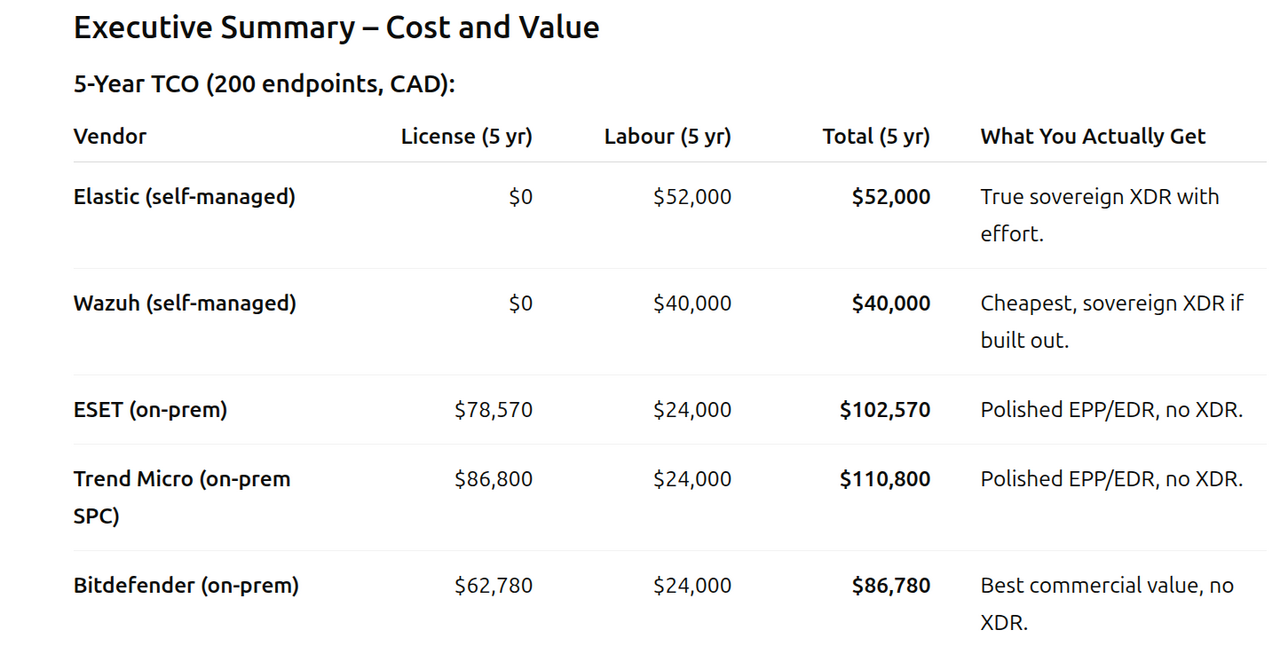
5-Year TCO (200 endpoints, CAD):
Why this matters:
- Commercial tools: Strong EPP/EDR value, less staff time, but no real XDR under sovereignty rules.
- Open source: True XDR possible (Elastic, Wazuh), but requires significant integration effort.
Validation is non-negotiable: Always test vendor promises with lab drills and security scenarios before production.